Chromecast Audio is a game-changer for turning any 'dumb' Hi-Fi system into a smart audio powerhouse. Plug in this tiny Google dongle, and stream music from your favorite apps without cables or hassle.
For parties or shared listening, Guest Mode lets friends cast music directly to your setup—no Wi-Fi credentials required.
Setup involves two steps: enabling the feature and having guests connect.
Ensure your phone and Chromecast Audio are on the same Wi-Fi network. Open the Google Home app and tap the Devices icon in the top right.
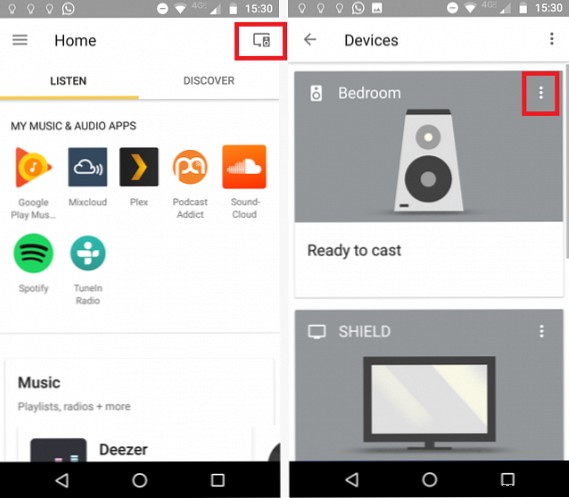
Find your Chromecast Audio, tap the three vertical dots in the top right of its card.
Then, select Guest Mode and toggle the switch to On. Note the PIN displayed in the app.
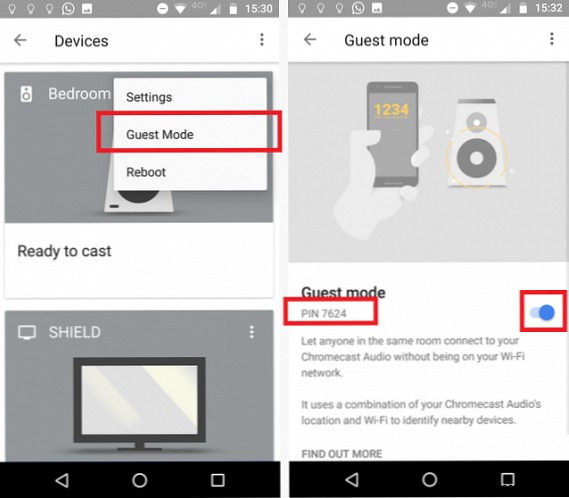
Guests simply open a Chromecast-enabled app (like Spotify or YouTube Music), tap the Cast button, and enter the PIN when prompted. They don't need your Wi-Fi network.
Guest Mode verified by our tech team—perfect for effortless sharing. Using it on your Chromecast Audio? Share your experience in the comments.
