Netflix makes binge-watching effortless, but a dropped Wi-Fi connection can switch to cellular data, consuming gigabytes and leading to hefty bills. This is a common pitfall for mobile users without unlimited streaming plans.
Protect yourself with Netflix's built-in Cellular Data Usage setting, available on both Android and iOS apps.
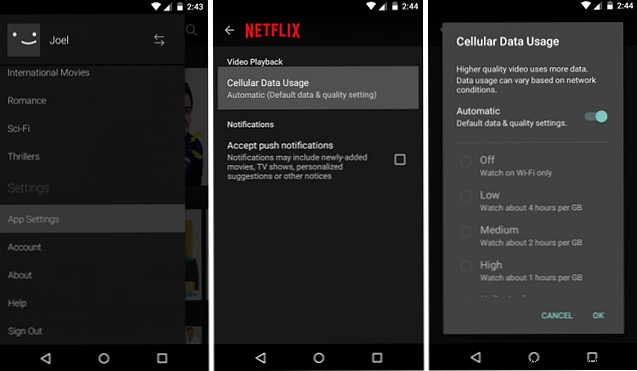
Here's how to set it up:
Select from these options:
Avoid 'Unlimited' to prevent excessive data use. Adjust based on your data plan, and update settings before your next session to stay in control.
How much data do you get monthly? What's your go-to setting? Share in the comments!
