As a longtime Kindle user and e-reading enthusiast, I know the joy of relaxing with e-ink that’s gentle on your eyes. Kindles excel at importing documents and PDFs—Send eBooks, documents, and articles to your Kindle via email or app. Whether it’s an annual report PDF or a Word proposal, you can send it easily.
However, not all PDFs translate well to Kindle screens. Even with tools like Adobe Acrobat or free alternatives, common issues persist:
This stems from PDF design priorities, not a flaw in the format. Still, it’s frustrating—wouldn’t it be ideal to read PDFs on Kindle without these hassles?
Luckily, there’s a free, open-source solution that delivers professional results every time.
K2pdfopt is a lightweight, free tool that optimizes PDFs (or DJVU files) specifically for Kindle devices. It handles multi-column layouts and scanned documents seamlessly, eliminating eye strain on e-readers. The screenshots below show the dramatic improvement, and the K2pdfopt website features more examples.
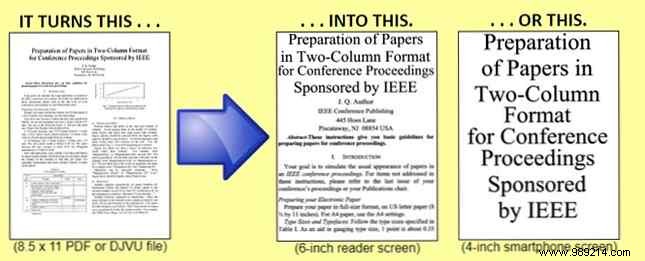
The process is straightforward:
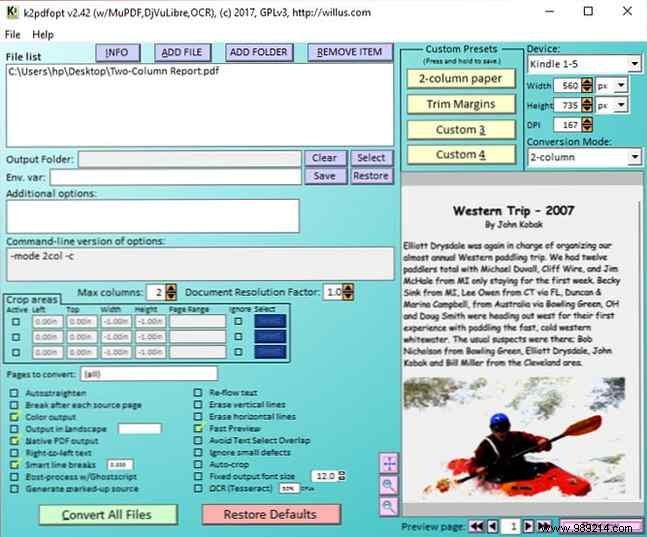
The developer explains that K2pdfopt doesn’t reflow text into a new PDF. Instead, it converts each page to a bitmap, detects text blocks, crops margins, and reassembles for maximum screen use. File sizes may increase due to bitmaps, but readability skyrockets.
Tweak defaults for personalization: adjust magnification, quality, rotate portrait to landscape, or enable built-in OCR for searchable text.
Do you convert PDFs or eBooks for better Kindle experiences? What tools work best for you?
