As a smart home enthusiast with years of experience integrating streaming services with Alexa devices, I've tested numerous setups to streamline music playback on Amazon Echo. While Echo supports Amazon Music, Pandora, iHeartRadio, and more, Spotify Premium users can easily make it the default for effortless voice commands.
Open the Alexa app on your phone, tap the  Menu button, then go to Settings > Music & Podcasts. If not already linked, select Link Account under Spotify and sign in with your credentials.
Once linked, tap Default Services and choose Spotify as your default music library. Now, commands like "Alexa, play [song]" will pull from Spotify automatically. Note: This requires a Spotify Premium subscription.
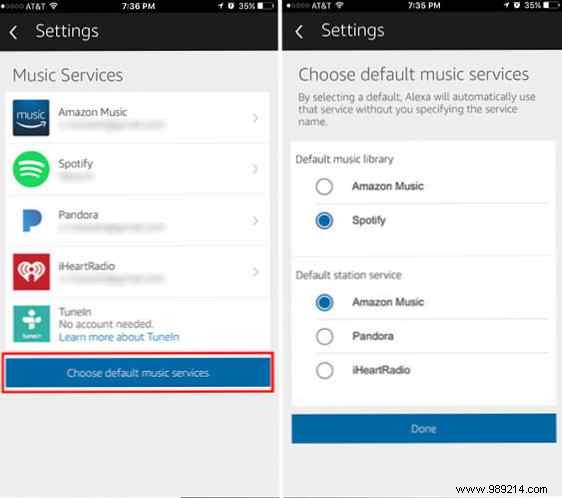
For default stations, options include Amazon Music, Pandora, and iHeartRadio. No link? Just say, "Alexa, play [song] on Spotify."
What's your top Amazon Echo use? Music only, or more? Share in the comments!
