Switching from Spotify to YouTube Music? Don't lose your carefully curated playlists. As experts who've tested dozens of music migration tools, we've identified reliable services that make the process straightforward and efficient.
Google imposes a limit of 10 playlists per day for transfers, so plan accordingly. These tools create public playlists by default—switch them to private or unlisted in YouTube Music settings afterward.
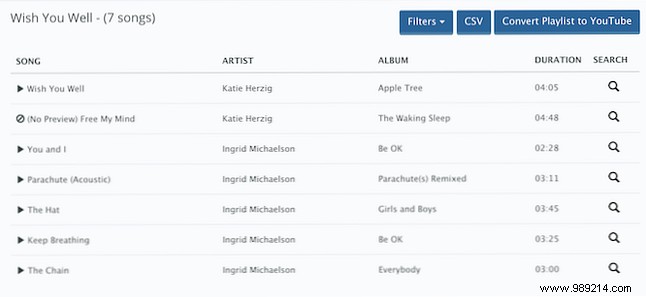
Playlist Buddy stands out for its speed and simplicity in moving Spotify playlists to YouTube Music. It handles transfers one playlist at a time, with a 300-track limit per list.
Sign in with Spotify to view your playlists. Select one, click Convert playlist to YouTube, authorize YouTube, and watch it transfer automatically. It alerts you if tracks fail to match but doesn't specify which ones. Bonus: Export to CSV for backups.
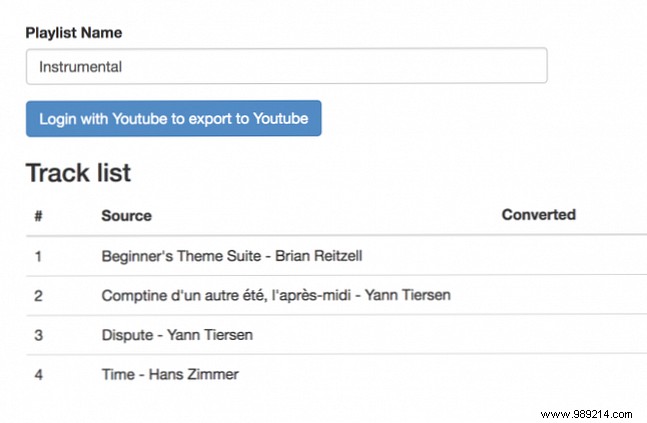
PlaylistConverter excels with playlists of any length, also handling one at a time. Click the Spotify tab, connect your account, and select from your playlist list.
This three-step process takes longer for large libraries—hundreds of tracks may require patience. First, choose and load your playlist. Then, click Convert to YouTube, optionally rename, and log in to YouTube. Once conversion finishes, hit Export to your YouTube account now. Track progress via the status bar.
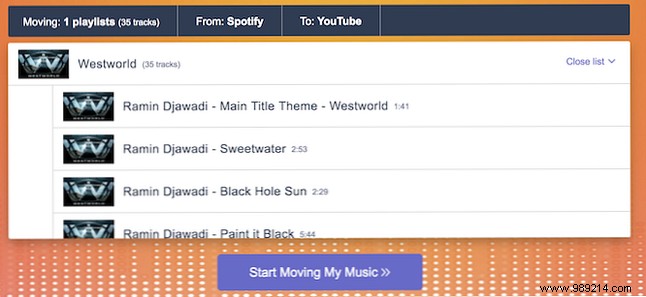
TuneMyMusic is a free standout for batch Spotify-to-YouTube Music transfers (capped at Google's 10-per-day limit). Select Spotify as source, paste a playlist link or load multiple via Load from Spotify. Choose YouTube Music as destination and click Start moving my music.
It shows transfer progress and flags unmatched tracks. Slightly less reliable than others, it occasionally stalls mid-process.
Not fully committed to YouTube Music yet? Use these for test transfers. For better YouTube listening, check our top 5 sites and extensions to enhance music playback. Read more.
