As a Kodi expert with years of hands-on experience setting up media centers for home theaters worldwide, I can tell you: Kodi looks deceptively simple at first launch. Its clean interface makes basic use straightforward. But dive deeper, and you'll uncover powerful features that transform it into a versatile entertainment hub.
Whether you're a newcomer eyeing Kodi for your streaming needs or a veteran refreshing key concepts, this comprehensive A-Z guide draws from real-world testing and community insights to demystify everything Kodi.
Addons extend Kodi's capabilities. Fresh installs start empty, so addons bring in content and services like YouTube, Hulu, Spotify, and Pandora. Stick to official sources to avoid illegal streams that could lead to legal issues.
A Kodi build bundles addons, shortcuts, and themes for quick setups—ideal for beginners. However, low-quality builds often include broken links and outdated addons, so choose reputable ones carefully.
Kodi is free, open-source software. Study, modify, or contribute via its GitHub repository. The core uses multiple languages, while most addons rely on Python and XML—perfect for developers.
Kodi excels with DLNA, letting you stream, browse, and share media across compatible devices. It can even control other DLNA gear. Learn more about DLNA.
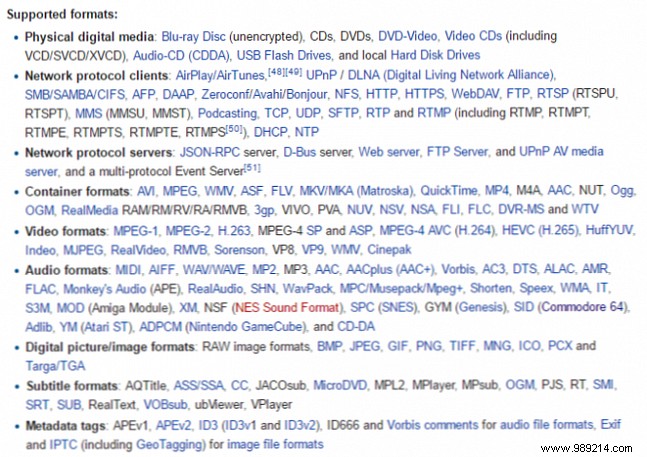
No media player matches Kodi's versatility—it handles virtually every format and media type. Check the full supported list below.
"Fully loaded" Kodi boxes fuel legality debates. Often sold on eBay or Craigslist with free content promises, they're typically low-quality and risky—potentially illegal depending on your location. Read our in-depth analysis.
While designed for remotes, Kodi pairs seamlessly with gamepads like PlayStation 4, NVIDIA Shield, and Xbox 360 controllers for precise navigation.
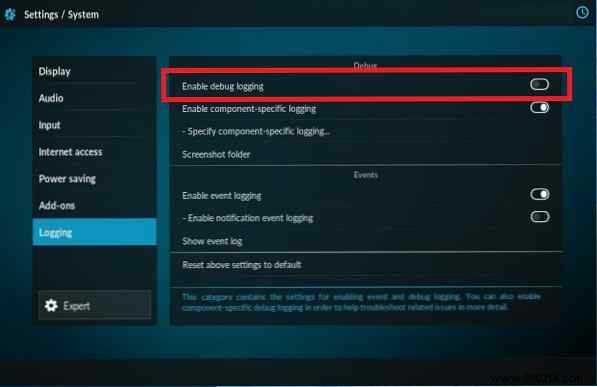
Troubleshooting is common; enable logging via Settings > System > Logging and share files on official forums for expert advice.
iOS compatibility is tricky, requiring workarounds with limited functionality—unlike seamless support on Android, Windows, and Linux.
JeOS (Just Enough Operating System) powers dedicated Kodi devices like pro set-top boxes. Distributions include OpenELEC, LibreELEC, OSMC, GeeXboX, XBian, and Buildroot. Find the best box for you.
The star of our guide: the open-source media powerhouse formerly known as XBMC.
LibreELEC (Libre Embedded Linux Entertainment Center), a 2016 OpenELEC fork, delivers a lightweight, preconfigured Kodi OS—great for ODROID devices.
Sync multiple Kodi instances across your home with a central MySQL database for seamless library updates.
Customize the scrolling RSS feed (default: Kodi news) via Settings > Appearance > Skin > Show RSS news feed for global headlines.
OpenELEC (Open Embedded Linux Entertainment Center) is a bootable OS optimized for Kodi on USBs, SSDs, Raspberry Pi, and WeTek Play.
Kodi's PVR integrates third-party backends for live TV, radio, EPGs, and recording worldwide.
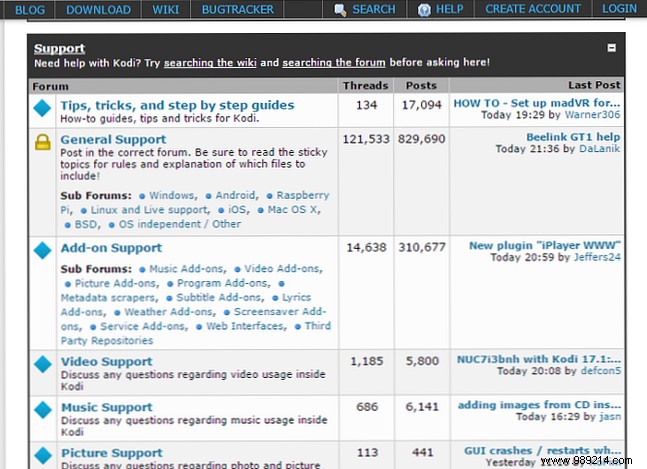
Join the Kodi forums—over 300,000 members cover tips, hardware, and more.
Repos host addons; prioritize the official Kodi repository for safe, legal options.
Customize looks beyond the default blue-black theme via Interface Settings > Skins.
Community volunteers support 74+ languages, from Tajik to Telugu.
Regularly back up this folder holding libraries, settings, thumbnails, and more—addons can automate it. Backup drive tips.
Stable version 17.3 (note historical jumps, like v2.0 to v8.0). Check yours with the Version Check addon.
Enable remote control via browser: Settings > Services > Control > Allow remote control over HTTP.
Kodi's predecessor (Xbox Media Center), rebranded in 2014 to avoid trademark issues.
The popular addon often hits quotas or errors like 'Exception in ContentProvider.' Fix with a custom API key (advanced).
XBMC's quirky 2011 mascot, created by user 'Fkoch' in a contest.

These 26 essentials build a strong Kodi foundation. What terms would you add? Share in the comments!
Bonus reads: Kodi for Beginners | Supercharge Your Setup.
