IBM Watson identified over 2,000 characters in George R.R. Martin's Game of Thrones book series. Keeping track of them all—their alliances, backstories, and fates—without notes is no easy feat.
Enter The Fictionary, a game-changer for immersive reading.
It's a specialized dictionary for fictional literature. Install custom dictionary sets on e-readers and Kindles to instantly look up made-up terms, characters, and places. Those 2,000 characters battling across the Seven Kingdoms suddenly feel familiar and easier to follow.
Created by developer Dave Byard as a passion project, The Fictionary has grown into a beloved resource. Each dictionary is tailored to a specific book or series. Download one for your Kindle or Kindle iOS app, and Android users can integrate it via the ColorDict app.
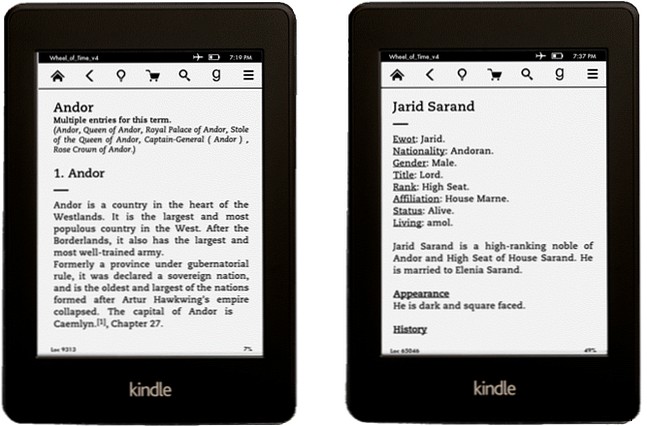
Currently, 37 Fictionaries are available for download, spanning genres like classic literature, sci-fi, and fantasy. Many are crafted by authors themselves or crowdsourced from dedicated fan wikis.
It functions just like a standard dictionary:
Entries are designed to be spoiler-free, preserving the story's surprises.
A thoughtfully built Fictionary bridges memory gaps, enhancing enjoyment of complex e-books. Unlike Kindle's X-Ray feature—which only works with purchased titles—Fictionary supports any book on Kindle or other e-readers.
Best of all, it's free and simple to set up. Powered by wiki communities and indie authors, it delivers rich context right at your fingertips.
Have you tried The Fictionary? Or do you prefer quick Google and Wikipedia searches mid-read?
